Boyaga: A Handwritten Font for Creative Web Projects
I was working on a redesign for a boutique online store, and the challenge was to make the brand feel more personal without sacrificing professionalism. The hero section needed a strong visual hook that would stand out on mobile and desktop screens. That’s when I came across Boyaga—a handwritten font with a quirky yet approachable personality. It felt like the perfect fit for this project.
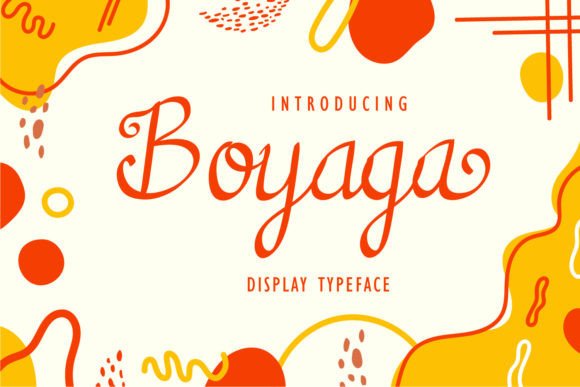
Boyaga is a fun and quirky handwritten font that brings warmth and character to any digital layout. Its irregular strokes and natural flow give it a sense of authenticity, making it ideal for creative projects where personality matters. As a designer, I immediately noticed how it could add a human touch to headers, banners, and promotional elements.
The first thing I tested was using Boyaga in the hero section. I placed it over a full-width image banner with a subtle overlay to ensure readability. On larger screens, the font looked great—its unique style didn’t clash with the background, and the text remained legible even at a smaller size. But when I previewed the layout on mobile, I realized I needed to adjust the font size slightly to maintain clarity on smaller screens.
One of the things I appreciated about Boyaga was its PUA encoding. This made it easy to access all the glyphs and ligatures directly from my design software. It saved me time and allowed me to fine-tune the typography without needing to hunt for special characters separately.
As I moved through the site, I considered where else Boyaga could be used. It worked well as a header for product categories, adding a friendly tone to the shop’s branding. For call-to-action buttons, I paired it with a clean sans serif font to balance the decorative style with usability. This combination helped guide users’ attention without overwhelming them.
Readability was a key concern, especially for longer sections. While Boyaga is excellent for short phrases and headlines, I avoided using it for body copy. Instead, I reserved it for decorative accents, such as feature titles or promotional banners. This ensured that the content remained easy to scan and digest while still maintaining a cohesive visual identity.
When designing for a coaching website, I found that Boyaga added a personal touch to the homepage. It was used for the main headline and in testimonials, giving the site a warm and inviting feel. The font’s casual style matched the brand’s message of approachability and support, which resonated well with the target audience.
Font pairing is always an important consideration. In this case, I paired Boyaga with a modern sans serif font for body text. This contrast helped create a clear visual hierarchy, guiding the user’s eye from the playful headline to the more straightforward content below. It also gave the site a polished look, balancing creativity with functionality.
Another thing to consider when using Boyaga is its performance. Since it’s a display font, I made sure to optimize the webfont delivery so it loaded quickly. I also checked the available styles and weights to ensure there were enough variations to meet the project’s needs. Fortunately, the font had a good range of options, including alternates that allowed for more stylistic flexibility.
I also thought about how Boyaga could be used in other parts of the brand’s digital presence. It worked well in social media graphics, email headers, and even as part of a digital brand kit. Its versatility made it a valuable asset for creating consistent and engaging content across multiple platforms.
For those considering Boyaga for their own projects, I’d recommend testing it in different contexts before finalizing your choices. Try it in headers, buttons, and promotional areas to see how it performs. Also, pay attention to how it looks on various screen sizes and backgrounds. A font that works beautifully on desktop might need some adjustments for mobile responsiveness.
Ultimately, Boyaga proved to be a great addition to the boutique store’s redesign. It brought a sense of personality to the brand while still maintaining a professional appearance. Whether you’re working on a portfolio site, course landing page, or blog redesign, this font can help elevate your design and make your content more engaging.
If you're looking for a creative font that adds charm without compromising usability, Boyaga from Script Amp is worth exploring. Its unique style and practical features make it a solid choice for any web designer or digital creator aiming to enhance their brand’s visual appeal.